 English
 Deutsch
 русский

1. What is a three-legged electric lift desk?
In an architect's late-night studio, three monitors tremble slightly on their desks, and every rotation of the drawing board causes an unnerving jolt. In the corners of urban micro-apartments, piles of books and monitors compete for already limited flat space—a dilemma traditional office furniture can't overcome. Until the advent of the three-legged electric lift desk, those corners, once known as "odd spaces," began to take on a new lease of life. More than just furniture, it allows heavy professional equipment to rise and fall smoothly, transforming every inch of wall space into an efficient workstation.
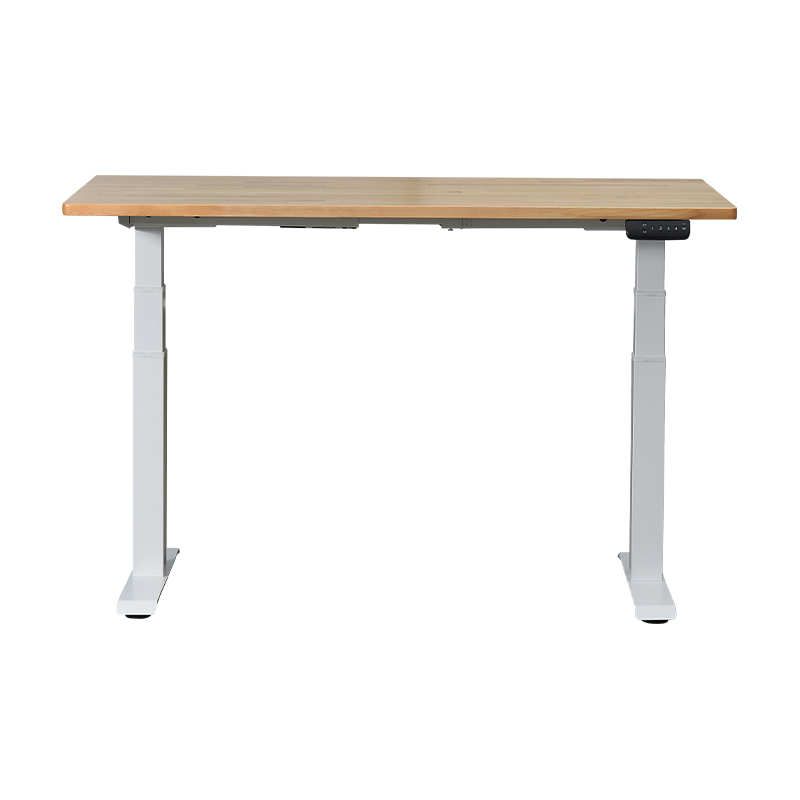
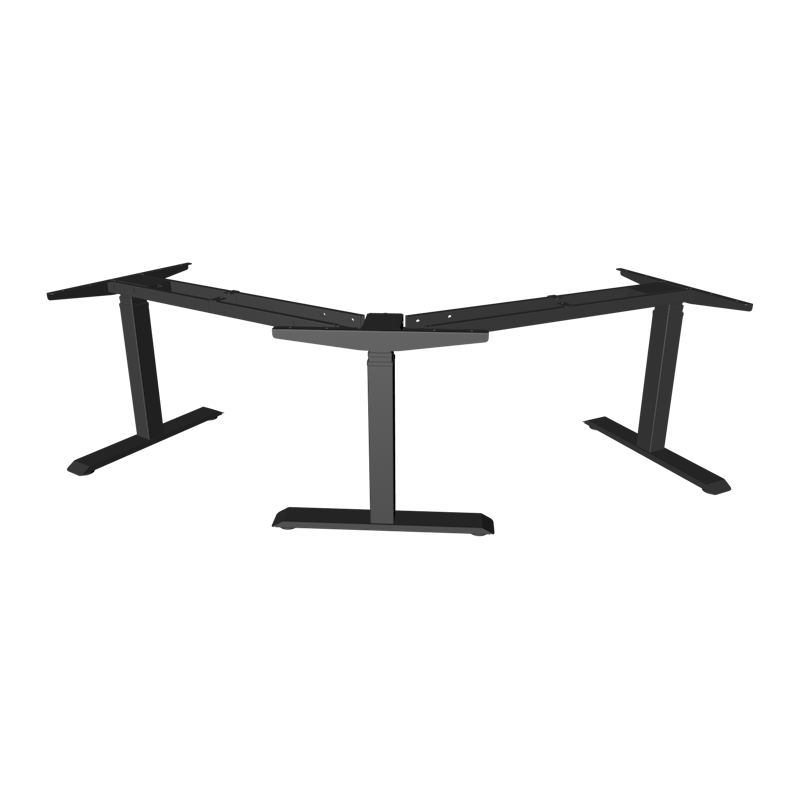
The three-legged electric lift desk's dual front legs and single rear triangular support leg form a golden triangle on the ground, quietly creating architectural-grade stability. With a load capacity of 150 kg, triple monitor stands, industrial-grade plotters, and 3D printers find a secure home on the lift desk. In rigorous testing with an 80 kg off-center load, the desk tilted only 0.6 degrees, far exceeding international stability standards. Even more ingenious is the honeycomb-like stress-distribution network within the columns, resembling the seismic resistance of buildings. It transforms equipment pressure into an evenly distributed load, completely eliminating the single-point deformation of traditional desks.
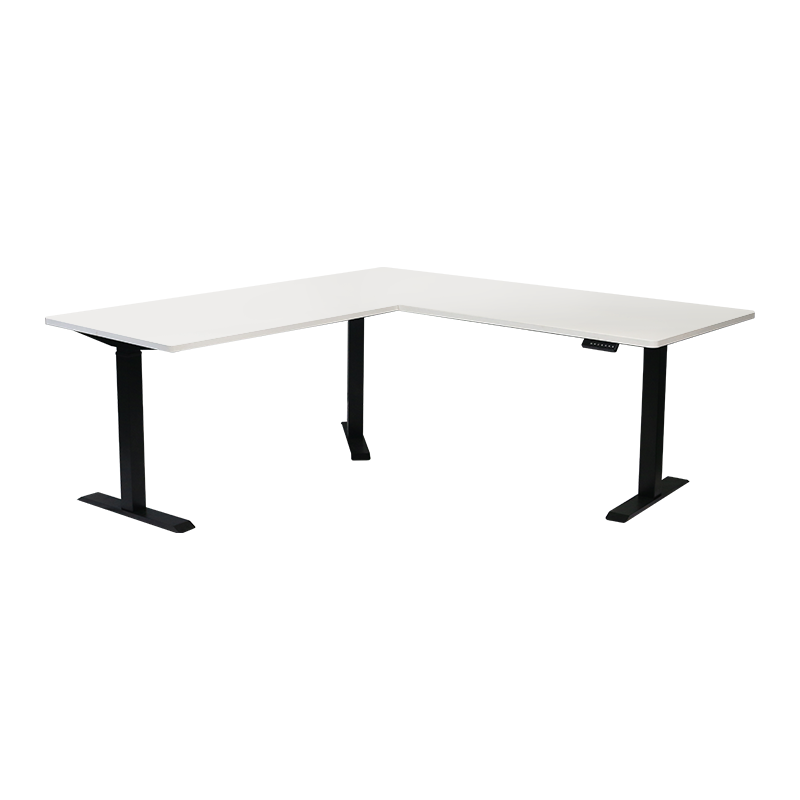
The L-shaped tabletop design, with its 120-degree golden corner that aligns with the wall, condenses the architectural concept of functional zoning into a compact space. The main surface houses a curved three-screen workspace, while the secondary surface displays architectural blueprints or prototypes. The naturally formed triangle at the corner becomes a creative gallery. The secret to this spatial magic lies in centimeter-by-centimeter customization—from a narrow 35-centimeter bay window desk to a luxurious 120-centimeter workstation, the awkward gaps between the irregularly shaped columns and the unconventional wall angles are transformed into professional battlefields.
The dual motors in the legs, coupled with a silent gearbox, suppress operating noise to a mere 48 decibels, barely noticeable even during late-night work. The gentle click of keystrokes becomes the most noticeable sound. The transition from sitting to standing occurs in just eight seconds, with a precise and smooth lifting speed of 25 millimeters per second. Most astonishingly, the lifting joint's error is stably controlled within 0.3mm—equivalent to the thickness of three A4 sheets. The maintainability design is even more revolutionary: the controller, motor, and power supply are securely connected, making replacing core components as easy as plugging in and out a USB drive. A triple protection system creates an impenetrable barrier: automatic overload shutoff protects precision instruments, voltage fluctuation compensation mitigates power grid anomalies, and the desk instantly locks in place when an accidental collision occurs. A wide voltage adaptive module allows this smart desk to seamlessly transition from an elite office in Tokyo's Ginza to a creative studio on the streets of Bangkok.
(1) Triangular mechanical structure: 150kg load-bearing capacity
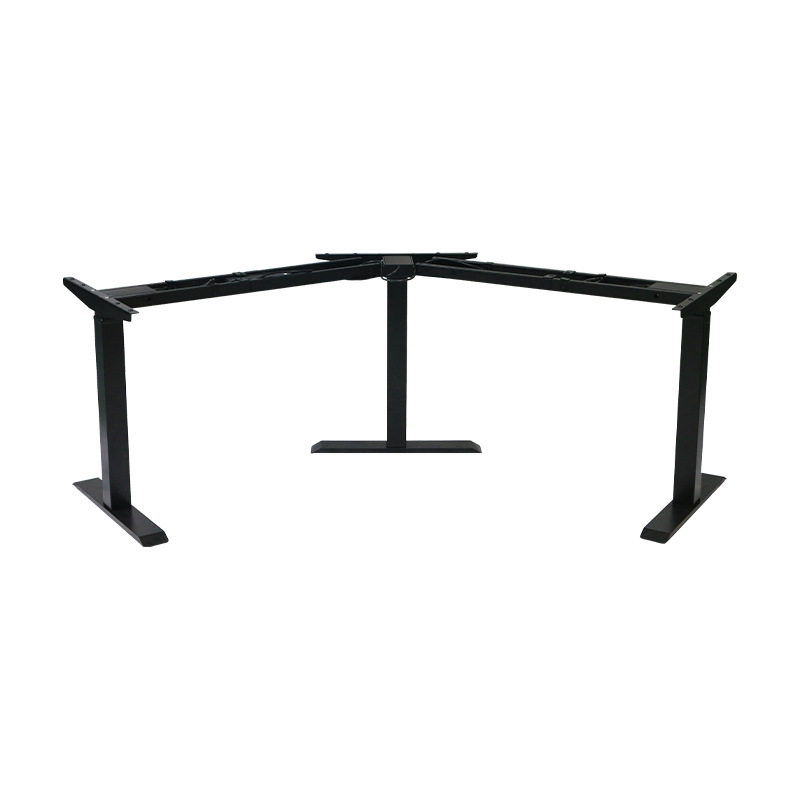
The three-legged structure uses double front legs and a single rear triangular support leg to build a stable pyramid:
Imported bearings are embedded in the alloy columns, and the self-lubricating system achieves 200,000 lifts without wear, with a lifespan twice that of traditional structures.
The 150kg load-bearing capacity easily supports triple screen brackets, industrial plotters, and 3D printers. The table tilts only 0.6° in an 80kg eccentric load test.
The honeycomb stress dispersion design forms a mesh reinforcement rib inside the leg tube, decomposing the equipment pressure into a uniform load, eliminating the risk of traditional single-point deformation.
(2) L-shaped space revolution: panoramic workstation for small apartments
The 120° golden corner design that fits the wall activates the forgotten space value:
Dual countertop symphony: the main counter extends to the secondary counter to form a surround workflow, with a 32-inch main screen on the left and architectural drawings on the right, and sample models displayed naturally in the corner area
Centimeter-level space magic: Customized countertops with a depth of 35-120 cm can be used to transform into professional workstations in unconventional areas such as special-shaped bay windows and column angles
Free scene switching:
Programmer mode: the main counter rises to 110 cm for standing coding, and the secondary counter remains at 75 cm for placing reference manuals
Live broadcast mode: the main counter is equipped with a ring light, and the secondary counter rises and falls to display product details
Parent-child mode: the dual countertops can be independently height-controlled to meet the needs of adults and children learning together
(3) Silent lifting science Technology
The built-in motorized system in the legs redefines lifting precision:
Library-grade silence: Dual motors and a silencer gearbox suppress operating noise to below 48dB (equivalent to the sound of gentle rain), allowing you to work late at night without disturbing your family.
25mm/s golden speed: Shift from sitting to standing in just 8 seconds.
Joint error ≤ 0.3mm: Aerospace-grade slides and a closed-loop control system eliminate the jitter and wobbling associated with traditional height-adjustable desks.
Maintainability breakthrough:
Plug-in electronic control system: The controller, motor, and power supply are connected using aviation connectors, making motor replacement as easy as plugging in and out a USB drive.
Triple safety features: Automatic overload shutoff, voltage fluctuation compensation, and emergency stop for accidental collisions safeguard heavy equipment.
Adaptive power module: Compatible with a wide voltage range of 100V-240V, ensuring stable operation in areas with global voltage fluctuations.
2.What are the advantages of a three-legged electric lift table?
(1) Stability of triangular mechanical structure
Dual front legs + rear triangular support legs form a building-grade stable triangle, which has a 30% increase in torsional strength compared to a four-leg structure. Self-lubricating bearings achieve zero wear after 200,000 lifts and lowering, easily carrying heavy equipment such as three-screen workstations and industrial plotters.
No worries about eccentric loads: In the 80kg eccentric load test, the desktop tilt is ≤0.6° (far below the ISO 1.5° standard), eliminating shaking when rotating large drawings or operating precision instruments.
(2) L-shaped desktop design: A panoramic workstation for small apartments
Golden corner activation technique: The 120° double-table design seamlessly fits the dead corner of the wall, and the main table extends to the secondary table to form an immersive work island. A two-person collaborative workstation can be realized in a 4㎡ space (traditional layout requires more than 6㎡).
(3) Silent lifting system: Library-level silent
Dual motor silencing technology suppresses noise to 48dB (like the sound of light rain), allowing you to work late at night without disturbing your family. 25mm/s golden lifting, switching between sitting and standing postures takes only 8 seconds, and the closed-loop control system ensures that the joint error is ≤0.3mm (the thickness of 3 A4 papers), and the coffee liquid level remains stable when heavy equipment is lifted or lowered.
Plug-in electronic control system modular design makes motor/controller replacement as easy as plugging and unplugging a USB flash drive, reducing maintenance costs by 70%.
(4) Space adaptability
The table depth supports flexible customization from 35 to 120cm, conquering unconventional spaces such as bay window angles and column gaps. The all-metal base compensates for ±3° slope differences, and the adaptive thermal expansion and contraction structure ensures a stable 28°C floor heating environment.
(5)Standing and working with a lift table
When slumped in a chair, the lumbar spine experiences pressure up to 1.5 times greater than when standing. The intervertebral disc shrinks by 2-3 mm under constant pressure, compressing the nerve roots and causing pain. When the desktop is lifted by a motor, the spine is instantly relieved of its load: the intervertebral discs relax as the pressure is released, and nutrient penetration increases by 37%. The erector spinae and transverse abdominal muscles activate synergistically, forming a natural mechanical corset that distributes the load across the torso. For those who alternate between sitting and standing for more than three hours a day, the rate of abnormal cervical curvature decreases by 52% and the risk of lumbar disc herniation decreases by 68%. When the body switches from sitting to standing, dormant muscle fibers are awakened, and the energy consumption curve rises sharply. Alternating postures each hour consumes 42% more calories than sitting alone—the equivalent of consuming two more slices of bread a day without gaining weight.
3.Common faults of three-legged electric lift table
(1) Complete failure (the table does not respond at all)
This is the most frustrating situation and is usually related to the power supply.
Fault phenomenon: There is no response when pressing any button and the indicator light is off.
Possible causes and troubleshooting :
steps: Power is not connected: This is the most common cause. Check whether there is power in the wall socket (you can try plugging in a mobile phone charger) and check whether the power cord of the lifting table is firmly plugged into the table body and the wall socket.
Power adapter failure: Check whether the "black box" (power adapter) near the table leg has a burnt smell or whether the indicator light (if any) is off. A damaged adapter will cause the entire system to lose power.
Internal wiring is loose: When the power is off, check whether all wiring between the power adapter and the control box, the control box and the motor, and the control box and the hand controller are tightly plugged in.
Fuse is blown: A few models of power adapters or control boxes have fuses in them. If the voltage is unstable or short-circuited, the fuse may blow.
Fault phenomenon: The indicator light is on, but there is no response when pressing the button.
Possible causes and troubleshooting steps:
Hand control (button panel) failure: The hand control itself is damaged. You can try gently tapping or pressing various parts of the panel to see if there's a temporary response. However, this usually means it needs to be replaced.
Control box failure: The "brain" of the table is malfunctioning and unable to process button commands.
Complete motor burnout: This is less likely, but a complete motor failure can also cause the system to stop working.
(2) Functional abnormality (partial function is not normal)
Fault phenomenon: The lifting table can only rise, not fall (or vice versa).
Possible causes and troubleshooting steps:
The retraction function is triggered when encountering resistance: This is the most common reason. Electric lifting tables have anti-collision protection. If there is resistance during the descent process (such as being entangled in the wires, hitting debris on the ground, or the table top is stuck), it will automatically stop and rise in the opposite direction for a short distance.
Solution: Clear the obstacles under and around the table to ensure that the lifting path is absolutely smooth. Then try to press and hold the descent button to see if it recovers.
Key micro switch is damaged: The key switch of a certain direction in the hand controller is damaged.
Single-side fault of the motor or drive circuit: There is a problem with the single circuit or motor winding that controls the rise or fall.
Fault phenomenon: The lifting process stops automatically in the middle, or the set height cannot be reached.
Possible Causes and Troubleshooting Steps:
Overload or Uneven Load: The total weight of the items placed on the table exceeds the maximum load capacity, or the weight distribution is extremely uneven (for example, all heavy objects are placed in the far corner), causing the motor overload protection to activate.
Solution: Remove some of the heavy objects to balance the load on the table.
Uneven Legs: The three legs of the table are not fully in contact with the ground, causing the table top to tilt. The system detects resistance and stops.
Solution: Adjust the foot pads on the bottom of the legs to ensure that all three legs are firmly on the ground.
Memory Error: The preset height memory value is incorrect.
Solution: Refer to the manual to perform a "factory reset" or "recalibrate the height" on the height adjustment table.
Fault phenomenon: The height display is inaccurate or flickering.
Possible Causes and Troubleshooting Steps:
Recalibration Required: This is the most likely cause. After extended use, the height sensor may accumulate errors.
Solution: Look for the "height calibration" or "reset" section in the manual. The usual operation is: first lower the table to the lowest point, then press and hold a button (such as the "down" button) for a few seconds, and the calibration is completed after hearing the prompt tone.
Poor contact of the hand controller cable: The cable connecting the hand controller and the control box is loose.
(3) Structural and noise faults
Fault phenomenon: Abnormal noise (such as creaking, clicking, and friction) is emitted during lifting.
Possible causes and troubleshooting steps:
Loose screws: This is the primary cause of abnormal noise. Check whether the screws at the connection between all legs and the table board, and at the connection between the crossbeam and the legs are tightened.
Three-leg imbalance: One leg is suspended or subjected to different forces, resulting in asynchronous lifting and lowering, causing metal distortion or friction sounds.
Solution: Adjust the foot pads to ensure that the three legs are stable. You can observe whether the three legs move synchronously during lifting.
Internal problem of the motor or gearbox: If the sound comes from inside the motor, it may be that the gears are worn or lack oil. In this case, you usually need to contact after-sales service.
Cable interference: The internal wires are not properly arranged and hit the moving parts during lifting and lowering, making noise.
Fault phenomenon: The table is unstable and wobbles when raised or lowered.
Possible Causes and Troubleshooting Steps:
Unlevel Floor: This is the primary cause of wobbling. Even if the three legs are flat, they will still wobble on an uneven floor.
Solution: Use foot pads or small pieces of wood to level them.
Legs Not Tightened: The screws connecting the legs to the table top were not fully tightened during installation.
Structural Deformation or Damage: In extreme cases, the legs or crossbars may have bent due to impact.
General Troubleshooting Procedure (Three-Step Solution)
When encountering a problem, we recommend following the following steps, which can resolve over 80% of "problems":
Power Cycle: Unplug the power cord of the desk, wait one minute, then plug it back in. This resets the control box and clears temporary errors.
Check Load and Obstructions: Remove all items from the desk and check under and around the desk for anything that might be stuck.
Recalibrate: Perform the official height calibration procedure (see the instructions for instructions).
4.Maintenance Guide for Three-leg Electric Lift Table
(1) Daily maintenance (once a week or a month)
These are simple habits that are effective.
Cleaning and maintenance:
Table surface: Wipe with a soft damp cloth. For stubborn stains, use a small amount of neutral detergent (such as diluted dish soap). Avoid using corrosive chemicals, abrasives, alcohol or solvents to avoid damaging the table coating. Legs and beams: Wipe away dust with a dry or slightly damp cloth. Pay special attention to cleaning the gaps between the lifting columns to prevent dust and debris from accumulating and affecting the smoothness of lifting.
Check stability:
Screw tightening: Check all joints for loose screws once a month, especially: The screws connecting the table top to the legs. The screws connecting the beams between the three legs.
Foot pads: Note: When tightening, only tighten until "tight". Excessive force may cause stripping or damage the threads.
Keep the lifting path clear:
Regularly check under and behind the table legs for obstructions. Ensure that the lifting process is not caught by wires, debris, or furniture, which could trigger the anti-collision retraction function.
(2) Periodic deep maintenance (once every six months or one year)
After the table has been used for a period of time, a more thorough maintenance can be performed.
Mechanical structure lubrication:
Lubrication area: For telescopic table legs, a very small amount of silicone-based grease or white lithium-based grease can be applied to the visible metal surface (non-plastic parts) of the inner column.
Operation method:
Raise the table to the highest position.
Clean the old oil and dust on the inner column with a clean cloth.
Dip a small amount of grease with your finger or a cloth and apply a thin layer on the surface of the inner column.
Raise the table several times to evenly distribute the grease.
Important tips: Do not use penetrating lubricants such as WD-40. It is mainly a rust remover, the lubrication effect is not long-lasting, and it will attract more dust.
Cable management inspection
Check whether the cable storage device (such as Velcro, cable management slot) provided with the table is loose. Arrange the power cord and signal cable to prevent them from getting tangled inside the table body or rubbing against moving parts.
System Calibration and Reset
Even if no problems occur, it is recommended to perform a height calibration every six months or one year to maintain accurate height display. Refer to your product manual for specific instructions (usually, lower the desk to its lowest position and then press and hold a button).
Usage and Preventive Maintenance
Proper usage habits are the best maintenance.
Balanced Loading
Avoid placing all heavy items (such as dual-monitor stands and computer cases) on the same side of the desk for extended periods, especially in the corners away from the third leg. Balancing the load reduces unilateral wear on the motor and structural components and prevents unusual noise and shaking.
Smooth Operation
When performing a lifting operation, keep items on the desk stable and avoid violently shaking or pushing against the desk during lifting.
Do not allow children to repeatedly play with the lift switch or sit on the desk.
Weight Limit
Strictly adhere to the maximum weight limit of the product. Weight calculations should include all items permanently placed on the desk, such as monitors, laptops, stands, and books.
Power Protection
During thunderstorms or when away from home for extended periods, it is recommended to unplug the power cord to prevent power surges from damaging the electrical control system.
Common Problems Self-Checklist for Three-leg Electric Lift Tables:
| Symptom | Most likely cause | Self-resolved steps (from simple to complex) |
| The indicator light is off and no buttons respond. | 1. The power is off. 2. The power adapter is faulty. |
1. Check the power supply: Verify that the outlet has power (you can test this by plugging in another appliance) and that the power plug is securely inserted. 2. Check the adapter: Verify that the indicator light on the power adapter (black box) is on and that there is no burning smell. |
| The indicator light is on, but no buttons respond. | 1. The hand controller cable is loose. 2. The hand controller itself is faulty. |
1. Restart the system: Unplug the power cord, wait one minute, and plug it back in. 2. Check the wiring: After powering off, check the cable connecting the hand controller to the control box. |
| Can only raise, not lower (or vice versa) | Anti-collision/resistance retraction function triggered | 1. Clear obstacles: Check the bottom and back of the table for wires or debris. 2. Check balance: Ensure all three legs are firmly planted and the tabletop load is evenly distributed. |
| Automatic stop during lift | 1. Overload protection 2. Retract upon resistance 3. Legs and feet are unbalanced |
1. Reduce the load: Remove some heavy objects to ensure the load is not excessive. 2. Balance the load: Avoid stacking heavy objects in corners. 3. Adjust the foot pads: Ensure all three legs are firmly planted on the ground. |
| Lifting speed slows or there is an unusual noise | 1. Loose screws 2. Excessive load 3. Lack of lubrication on the inner column |
1. Tighten screws: Check and tighten all screws at the joints. 2. Reduce the load: Remove unnecessary heavy objects. 3. Clean and lubricate: Clean the inner column of the table legs and apply a small amount of silicone grease. |
| The table is wobbling. | 1. Unlevel floor. 2. Raised to the highest position (physical characteristics). 3. Loose screws. |
1. Adjust the footrests: Place something under the suspended legs so that the three legs are grounded. 2. Avoid using the table at a high position: Avoid leaning on it when in the highest position. 3. Tighten the screws: Check the screws connecting the legs to the table top and the crossbar. |
| Unsteady or jerky movement during lifting. | 1. The three legs are out of sync. 2. Internal cable interference. |
1. Recalibrate: Perform the height calibration procedure. 2. Organize the cables: Check and organize the cables inside the table. |
5. FAQs about three-legged electric lift tables
Part 1: Product Concept and Purchasing
(1) What is a three-legged electric lift table? How does it differ from two-legged and four-legged models?
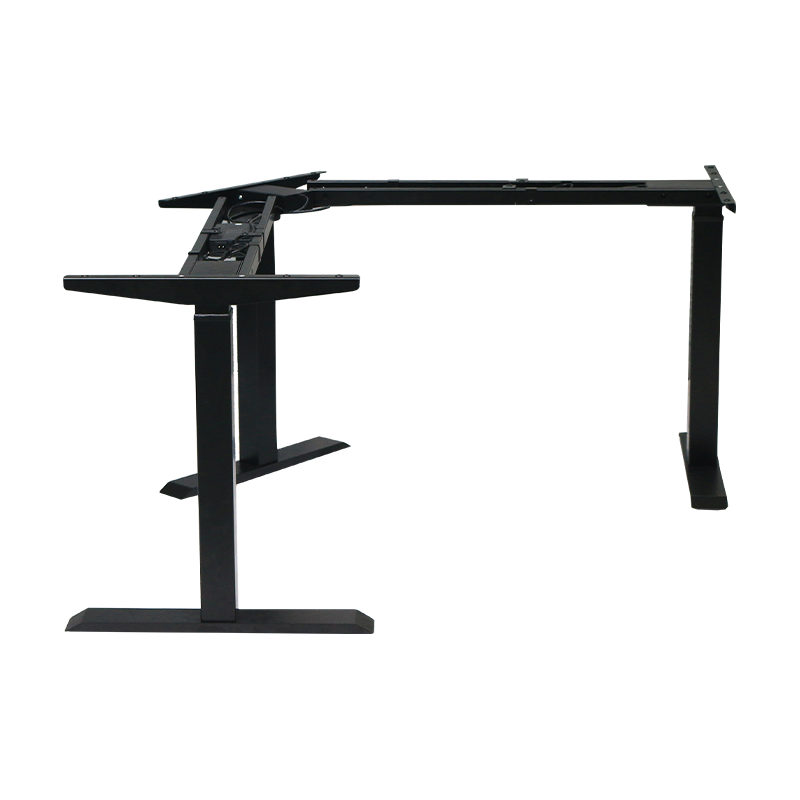
A three-legged electric lift table typically features a "single motor + three-leg support" structure. A single motor drives three legs simultaneously via a transmission rod, forming a stable triangular support structure. Compared to a two-legged table, a three-legged structure provides better support in the center and front of a large tabletop (especially one over 1.4 meters wide), effectively preventing the tabletop from sinking or swaying under its weight. This makes it particularly suitable for heavy items such as multi-monitor stands. Compared to a four-legged table, it saves space, avoids the "seesaw" effect that can occur with four legs due to uneven floors, and is generally less expensive than a two-motor, four-legged model.
(2) How stable is the three-legged structure? Will it wobble?
A three-legged structure inherently offers excellent geometric stability. Its stability depends primarily on three factors:
Floor flatness: This is the most common cause of wobble. Even if the table itself is flat, uneven ground can cause one leg to become dangling.
Table Size and Load Capacity: Very stable when within the maximum load capacity and the load is balanced. Any height-adjustable table will experience slight wobbling when raised to its maximum height. This is a physical characteristic, but a three-legged design generally keeps this within acceptable limits.
Manufacturing Process: Steel thickness and connector quality are crucial.
(3) What key specifications should I consider when purchasing?
Weight Capacity: We recommend choosing a model with a load capacity of at least 100 kg, leaving ample headroom for the desktop.
Lift Range: The typical range is between 60-125 cm. Ensure the lowest height allows for comfortable sitting and the highest height allows for comfortable standing.
Motor Type: Available in single and dual motors. Three-legged tables are mostly single-motor powered, offering a more cost-effective price. Dual motors offer greater power, are quieter, and have a longer lifespan, but also come at a higher price.
Noise Level: High-quality motors typically produce a lifting noise level below 50 decibels.
Warranty Policy: The warranty period for the motor, bracket, and controller is a key indicator of product quality.
Part 2: Installation, Use, and Maintenance
(4) Is installing a three-legged lift table difficult?
The installation process is typically modular and of moderate difficulty.
Key steps include:
Connect the two motorized legs to the crossbar.
Connect the third, driven leg to the other end of the crossbar.
Flip the assembled bracket over and secure it to the back of the tabletop.
Connect all cables for the motor, controller, and power supply.
The most important step: After installation, ensure all three legs are firmly in contact with the ground by adjusting the foot pads on the bottom of the legs. This is a prerequisite for smooth operation.
(5) How to use and maintain the table correctly?
Balance the load: Avoid placing all heavy objects in one corner of the tabletop for extended periods of time; distribute them evenly.
Keep the lift path clear: Regularly check and remove obstructions (such as power cords and debris) in the lift path.
Regularly tighten: Check and tighten all screws every six months, especially at the connection between the legs and the tabletop.
Cleaning: Wipe the tabletop with a slightly damp soft cloth, avoiding the use of abrasive cleaners. Clean the leg guides with a dry cloth to remove dust.
Lubrication: Apply a small amount of silicone grease to the telescopic inner column annually to maintain smooth lifting.
(6) Why does my table automatically stop or rebound after reaching a certain height?
This almost always triggers the built-in anti-collision protection (recoil when encountering resistance) feature. Please check immediately:
Under the table: Are there any tangled wires or objects trapped?
Top of the table: Is the load severely overloaded or unbalanced?
Floor: Is it level, and are all three legs touching the ground?
Solution: Remove any obstructions, reduce and balance the load, adjust the footrests, and try again.
Part 3: Troubleshooting and After-Sales
(7) The table is completely unresponsive and the indicator light is off. What should I do?
Troubleshoot the following:
Check the power supply: Verify that the wall outlet has power (you can test this by plugging in a mobile phone charger) and that both ends of the power cord (wall outlet and table body) are securely plugged in.
Check the adapter: Verify that the indicator light on the power adapter (black box) is on and that there are no unusual sounds or burning smells.
Restart: Unplug the power cord, wait one minute, and then plug it back in to perform a "soft reset."
(8) What should I do if the height display is inaccurate or the memory function is malfunctioning?
This is the most common minor malfunction and requires height calibration.
General calibration method (please refer to the manual): Lower the table all the way to the floor. Then press and hold the down button (or designated setting button) for about 5-10 seconds until the controller beeps or flashes, indicating calibration is complete. After calibration, simply reset your memory height.
(9) What causes unusual noises (creaking, clicking) during lifting?
Creak/rubbing noises: Most likely loose screws. Tighten all screws. It may also be due to lack of lubrication on the inner legs.
Clicking/banging noises: Internal cables may not be properly secured, hitting the metal bracket during lifting. Open the cable management cover to check and organize them.
Continuous unusual motor noise: If the motor sound becomes harsh or muffled, it may be a problem with the motor or gearbox itself. Contact customer service.
(10) When should I contact customer service?
If you encounter the following situations, do not disassemble core components yourself and contact customer service immediately:
After investigation, it is determined that the power adapter, control box, or motor itself is damaged.
The table legs or beams are physically bent or broken.
During the warranty period, before performing any operation that may void the warranty.
All self-troubleshooting methods are ineffective.